Some links on this page are affiliate links. If you purchase through them, I earn a small commission at no additional cost to you. This does not affect which products I recommend.
Your phone is the single most important piece of technology you carry on a thru-hike. It’s your navigation, your camera, your weather forecast, your emergency contact, and your offline reading library. Getting the setup right matters more than almost any other gear decision.
I’ve tested phones and charging setups across thousands of miles of trail: from the PCT to the CDT to the AZT to the Hayduke. I’ve run iPhones, Samsung Galaxies, and various Motorola Androids (Moto X, Moto Z Play, Moto Z4) over the years. This page covers what I’ve learned about keeping a phone alive in the backcountry, what setup I use now, and what settings actually matter.
Contents
- Phone Choice
- Battery Strategy on Trail
- Power Banks and Charging
- Solar Charging
- Essential Apps
- Weight and Setup
Phone Choice: Efficiency Beats Capacity
Most backpacking phone advice focuses on battery size: bigger mAh = better. That’s wrong. What actually matters for a thru-hiker is battery efficiency (how many hours of real use you get per mAh) combined with phone weight. You’re carrying a power bank anyway. The phone’s job is to use those mAh as efficiently as possible while not weighing you down.
To quantify this, I pulled 30 phones from Tom’s Guide’s standardized battery test (2023-2026) covering flagships, mid-range, and budget options. The test runs continuous web browsing over 5G at 150 nits. I calculated efficiency (screen-on time per mAh) and ran the math on the full system: phone plus a Nitecore NB10000 (156g, 10,000 mAh) at 75% round-trip charge efficiency.
The Efficiency Calculation
The 75% round-trip efficiency accounts for real-world losses: the bank discharges at less than rated capacity, and the phone’s charging circuit isn’t 100% efficient. A 10,000 mAh Nitecore realistically delivers ~7,500 mAh into your phone’s battery.
Trail days are calibrated from my own, extensive Galaxy S23 experience over thousands of miles: 2.5-3 days per charge on trail (battery saver on, airplane mode on, moderate navigation use). The S23 scores 10h 27m on Tom’s Guide, giving a calibration of 0.26 trail days per Tom’s Guide hour. That factor applies uniformly across all phones to estimate real trail performance.
Ranking metric: combined SOT-hours per gram of total system weight (phone + bank). A higher number means more battery life per gram carried. Click any column header to sort.
* OnePlus 13 / 13R: older Tom’s Guide methodology; results may be 5-10% higher than current protocol.
† ROG Phone 9 Pro: gaming phone (Snapdragon 8 Elite, heavy). Moto Razr Ultra: clamshell foldable.
‡ Galaxy S23: calibration reference. Trail days estimated from personal use (2.5-3 days per charge with battery saver on).
2026 phones (OnePlus 15, OnePlus 15R, iPhone 17 series, Galaxy S26 Ultra, Moto G 2026 series) used an updated TG protocol. Minor cross-protocol caveats apply. Nitecore NB10000: 156g, 75% efficiency = 7,500 mAh delivered.
What This Tells You
- The Galaxy S25 tops the system rankings, not the OnePlus 15. The OnePlus 15 has far higher raw screen-on time (1,513 vs 943 minutes), but the Galaxy S25 wins the combined SOT/g metric because it is the lightest flagship Android tested (162g). When you add the NB10000’s 163g, a heavier phone forces a heavier total system for equivalent coverage. The S25’s combination of low weight and strong Snapdragon 8 Elite efficiency edges out every other phone in this dataset on the metric that matters for backpacking: total days of coverage per gram carried.
- Budget Moto G phones rank 3rd through 5th. The Moto G (2025), Moto G (2026), and Moto G Play (2026) all land just behind the OnePlus 15 in system efficiency. At $200-250, they are within 5% of the Galaxy S25’s combined SOT/g score. If you are buying a phone primarily for long trail use and cost matters, this data supports the Moto G lineup as a genuine alternative to flagships.
- The OnePlus 15 and OnePlus 15R are the only phones that cover a 5-day carry without the bank. The OnePlus 15 reaches 6.6 days standalone; the 15R reaches 5.8 days. Both are candidates for leaving the power bank at home on a 5-day stretch, though the 15 has a more comfortable margin. Every other phone in this dataset falls below 5 days on its own. The 15 paired with the bank reaches 13.5 days; the 15R paired with the bank reaches 11.6 days.
- 28 of 30 phones clear 8 days total with the NB10000. The only exceptions are the Pixel 8 (6.3 days) and Pixel 8 Pro (6.6 days). For almost any current or recent phone, a 10,000 mAh bank comfortably covers a 5-day resupply carry with days of margin.
- iPhone 16 Pro (2024) ranks 11th, ahead of newer 2025 Androids. Apple Silicon’s per-mAh efficiency is high enough that a 2024 iPhone 16 Pro outranks the 2025 Galaxy S25 Ultra, 2026 Galaxy S26 Ultra, and the OnePlus 13. If you have an iPhone 16 Pro, you have a competitive trail phone; there is no efficiency case for upgrading.
- All four Pixels cluster at the bottom of the efficiency rankings. The Pixel 10 Pro XL (2025) ranks 26th of 30. The Pixel 9 Pro XL ranks 27th. Both Pixel 8-generation phones are last. Google’s Tensor chip is substantially less efficient than Snapdragon 8 Elite or Apple Silicon at equivalent workloads, and Google’s battery saver stack does not close the gap. The Tensor efficiency problem spans every generation in this dataset.
Other Factors That Matter
- Durability and water resistance. IP67 or IP68 rated. My Moto Z Play eventually failed from water damage after two years of heavy trail use. Every modern flagship passes this bar.
- Camera quality. Modern iPhone and Pixel cameras are excellent. You don’t need a dedicated camera if you have a current flagship.
- Use what you know. The best backpacking phone is whichever phone you already own. The efficiency differences between #2 and #6 on the chart above are real but not large enough to justify buying a new device. Where it does matter: if you’re comparing a current Samsung or iPhone against a 2023-era Pixel, the efficiency gap is large enough to affect real trail decisions.
Battery Strategy on Trail
The two most important things you can do for phone battery life on trail are airplane mode and battery saver. Enable both before you leave town and leave them on for the entire carry. Neither involves any real tradeoff on trail: you have no cell signal to use anyway, and battery saver’s performance restrictions don’t matter when your only app is navigation.
Battery-Saving Settings That Actually Help
- Battery saver on, airplane mode on, Bluetooth off, WiFi off. These are set before you leave town and stay on for the entire carry. Battery saver (Android) or Low Power Mode (iPhone) throttles background processes and limits app refresh. Airplane mode eliminates the single biggest power drain in the backcountry: a phone actively scanning for cell signal burns battery fast.
- Display brightness low. Screen brightness is the second-biggest power draw after cellular. Get a screen protector with good antiglare so you can read at low brightness outdoors.
- Dark mode. On OLED screens (most modern flagships), dark mode saves meaningful battery. On LCD screens, the effect is minimal.
- Disable always-on display and auto-rotate. Minor savings, but every bit helps on a 7-day carry between towns.
- Turn off GPS when not actively navigating. In FarOut, you can toggle the GPS: turn it off when you’re in camp or on obvious trail, on when you need position confirmation.
Battery Saver Quality Varies Significantly by OEM
The Tom’s Guide scores in the comparison table above are measured without battery saver enabled; that’s a controlled test condition. On trail, with battery saver always on, your actual performance will be better than the “Days Alone” column suggests. How much better depends on which phone you have.
Samsung One UI battery saver is aggressive and effective. Background app activity is tightly restricted, screen brightness is capped, and the OS doesn’t fight the mode. On a Galaxy S23 with battery saver on and moderate navigation use, I consistently get 2.5-3 days per charge; on lighter days, it pushes to 4 days.
Google Pixel battery saver (2023 generation) is notably weaker. The Pixel 8 has a larger battery than the Galaxy S23 (4,575 mAh vs 3,900 mAh), but delivers only about 2 days per charge on trail with battery saver enabled. Despite having more raw capacity, the combination of Tensor chip inefficiency and a less aggressive battery saver stack results in dramatically fewer real-world trail days. The table shows this clearly: Pixel 8 and Pixel 8 Pro are the only phones in the dataset that fail the 8-day mark even with a full NB10000.
iPhone Low Power Mode sits between the two. Apple’s A-series chips are highly efficient to begin with, so the absolute gain from Low Power Mode is smaller in percentage terms. It’s still worth having on; you’re just starting from a better baseline.
What this means in practice: the spec sheet battery size is a poor predictor of trail performance. A Pixel 8 with a larger battery than the Galaxy S23 delivers fewer trail days. If you’re choosing between phones for a long trail and the options include a 2023-era Pixel alongside a Samsung or iPhone of similar vintage, the Samsung and iPhone options have a meaningful real-world advantage that doesn’t show up on the spec sheet.
Temperature and Battery
Cold kills battery capacity. At 30-40 degrees F, a lithium battery can lose 20-30% of its effective capacity. At freezing and below, the degradation is worse. Keep your phone in an inside pocket or sleeping bag on cold nights. This matters more than most people realize on alpine trails in early season.
Power Banks and Charging
A power bank is essential for any multi-day trip without reliable charging access. The math is simple: figure out how many charges you need between town stops, then pick a bank that covers it with margin.
Capacity
For most thru-hikers with 3-5 day carries between resupply, a 10,000-20,000 mAh bank is right. Here’s a rough guide:
| Trip length between charges | Bank size | Notes |
| 1-3 days | 5,000-10,000 mAh | Light option, most trail scenarios |
| 3-5 days | 10,000-20,000 mAh | Standard thru-hiker setup |
| 5-7+ days | 20,000+ mAh | Remote sections, CDT wilderness carries |
Weight vs. Capacity
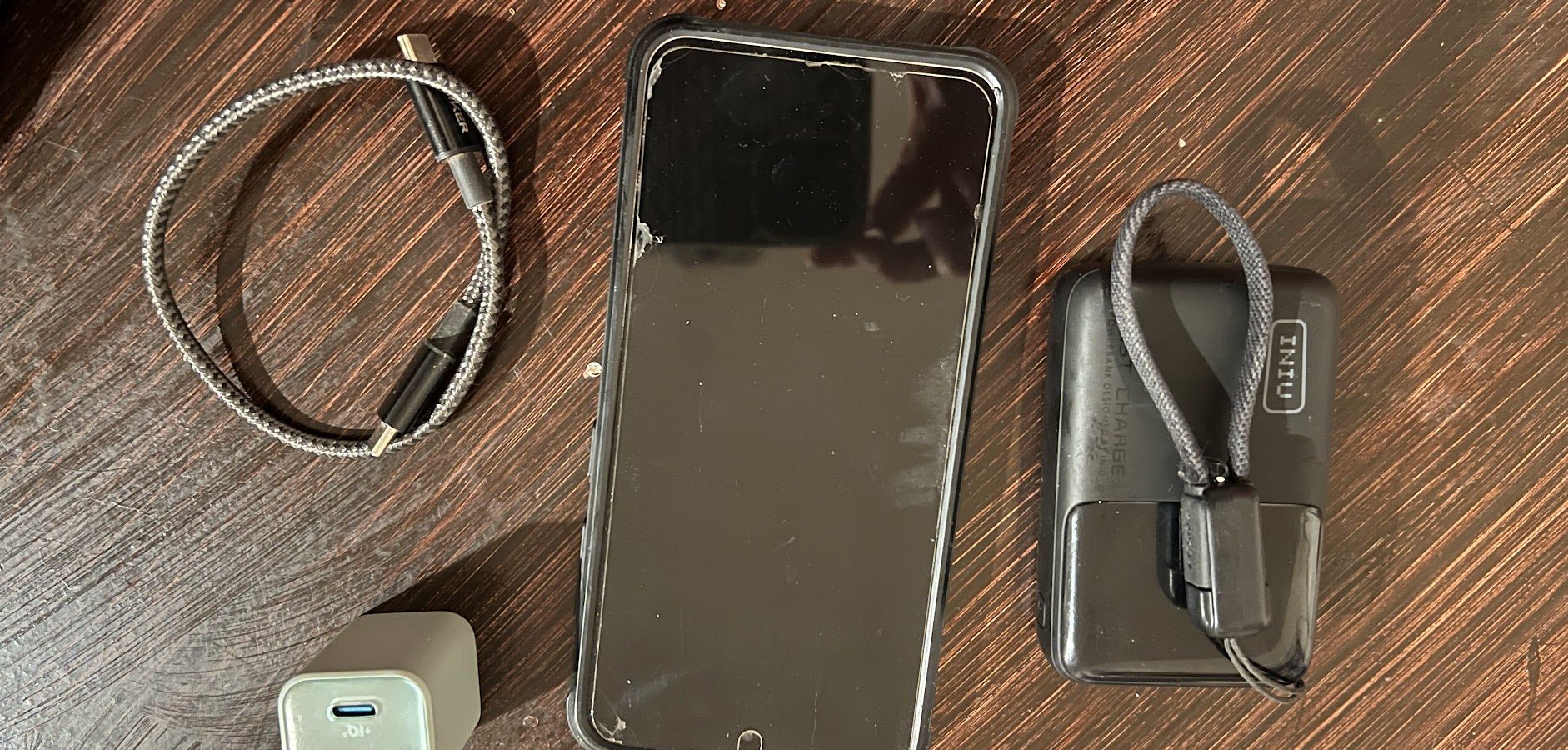
Modern slim power banks get to the 155-165g range for a 10,000 mAh bank. My current recommendation is the INIU 10,000 mAh at 158g. It has a built-in USB-C cable (no separate cable needed to charge the bank), fast PD input, and dual-port output. The built-in cable weighs 11g versus 8g for a separate Anker short cable, but you save carrying a dedicated bank cable. The Nitecore NB10000 is the alternative at 156g with similar specs.
Charging Strategy in Town
The goal is to minimize time in town. With a fast charger (30W+) and a modern phone and bank that support fast charging, you can top both from 20% to 80% in under an hour. My setup on the PCT let me be in and out of most resupply stops in 30-45 minutes without battery anxiety. The key is:
- A wall charger that supports USB-C PD at 30W or higher. The Anker Nano 30W is 1.4 oz and charges a modern phone or bank at full speed.
- A power bank that supports PD input (many cheap banks only accept 10-18W input even if the output is fast). The INIU 10,000 mAh accepts 22.5W input.
- Short USB-C cables to reduce weight and tangles. Anker 1-ft braided USB-C cables are 8g each and support full charge and data transfer speeds. Carry two.
- Dongles for anything that isn’t USB-C. I run a redundant set: USB-C to USB-A (3g), USB-C to Garmin (3g), and USB-C to Micro-USB (3g). Redundant set adds 18g total, which is worth it given how often one gets lost or fails mid-trail.
Dual-port chargers let you charge the phone and bank simultaneously; faster to get back on trail.
Solar Charging
Solar panels are compelling (free power from the sun) and genuinely useful on trails with consistent sun exposure. I’ve run solar setups on the AZT and the CDT with mixed results. The honest summary: solar charging works, but it’s not for everyone. Finicky electronic setups take a beating on trail, and you may have to overnight yourself a powerbank at a resupply if the system breaks.
The practical problems with solar on trail:
- You have to carry it carefully. I damaged my solar setup within the first 100 miles of the AZT. Solar panels don’t like to be stuffed into a pack or have things put on top of them.
- Trail conditions vary. Desert trails (AZT, Hayduke, CDT New Mexico) with reliable sun are great for solar. Dense forest (PNT) is essentially useless for solar. Know your trail before buying a panel.
If you go solar, the Lixada Solar Panel with a cheap 5000mAh battery pack with dedicated charging/discharging ports is my go-to. You can also use the 21700 cells from VapCell to further reduce weight, but I’ve found that to result in on-trail damages. Read my complete solar panel write-up for more details on running a solar setup, which is often better than power banks.
For most hikers on most trails, a power bank is simpler than solar. Solar is worth it if you’re on a long trail in the American west, and feel like you need more than a 10,000 mAh battery.
Essential Apps for Thru-Hiking
Navigation
- FarOut (formerly Guthook). The standard for trail-specific navigation. GPS, water sources, campsite notes, and current conditions from other hikers. Get the guide for your specific trail before you leave; it works offline. Essentially mandatory for PCT, CDT, AZT, PNT, and TRT.
- Gaia GPS. Better for off-trail and route-finding use. The topo layers are excellent. More powerful than FarOut for custom routes, alternates, and trails without a dedicated FarOut guide. I use both on most hikes.
- CalTopo. Web-first with a mobile app. Better than Gaia for planning, similar for navigation. Worth having for pre-trip route review even if you primarily use Gaia on trail.
Weather
- Mountain Forecast / Weather.gov. Check before you leave town. Mountain Forecast has better elevation-specific forecasts than most consumer weather apps. Weather.gov is more granular and usually more accurate for alpine terrain.
Planning and Communication
- Garmin inReach / Zoleo / SPOT. These are satellite messengers, not phone apps. But the phone app controls them. A satellite messenger for two-way texting and SOS capability is worth it on remote trails like the CDT and Hayduke.
- LighterPack. Has a mobile view. Useful for checking your pack list while in town deciding what to send home.
Weight and Complete Setup
Here’s a realistic weight breakdown for a complete phone and charging setup for a standard thru-hike:
| Item | Weight | Notes |
| Phone + case | 5.7-8.3 oz | Galaxy S25: 5.7 oz, iPhone Air: 5.8 oz, OnePlus 15R: 7.5 oz |
| Power bank (10,000 mAh) | 5.5-5.6 oz | INIU 10K: 5.6 oz (preferred, built-in cable); NB10000: 5.5 oz |
| Wall charger (30W) | 1.4 oz | Anker Nano 30W |
| Cables (2x 1-ft USB-C) | 0.6 oz | Anker braided short cables, 8g each |
| Dongles (redundant set) | 0.6 oz | USB-A, Garmin, Micro-USB adapters, 3g each; carry two of each |
| Total | 14-17 oz | Reasonable for what you get |
Adding a solar panel brings the total to 18-21 oz depending on the panel. Worth it on long sun-exposed trails in the American west where you find yourself needing more than a single 10,000 mAh bank per carry.